
To get started with offsetting the carbon impact of construction equipment energy, begin by running an LCA for your project. LCAs give you the information on how much carbon you need to offset in order to achieve carbon neutrality. Keep in mind that, according to EN 15978 standards, carbon offsets are not part of the LCA boundary scope. Therefore, this will need to be modeled outside of the headline of the LCA.
Carbon offsets deviate from the EN15978 standards. Therefore, carbon offsets as a design strategy need to be modeled as a scenario outside of the headline of the LCA.
Below is an example of how your ‘Scenarios’ should look to meet EN 15978 standards while being able to model the Construction Equipment Energy Use Offsets.

Jump to the following sections in this post:
- eTool Modeling Guide
- Calculating the GWP/MJ figure for alternative LCI Sources
- Reporting
- Related articles
eTool Modeling Guide
1. Calculate Total MJ of Construction Equipment Energy to offset
To calculate the total MJ of energy used for construction equipment, use the analysis tab to filter the PERE & PENRE results. These two figures you add together to give you the total MJ of construction equipment energy to offset.
To get this done, first you make sure the indicators PERE & PENRE have been turned on at the Project level. Don’t forget to click on ‘Save’.

Then go to the Design level > Analysis tab and use the ‘Custom’ analysis option and the combination shown in the below image to obtain the total MJ. Make sure all construction equipment items have been included.

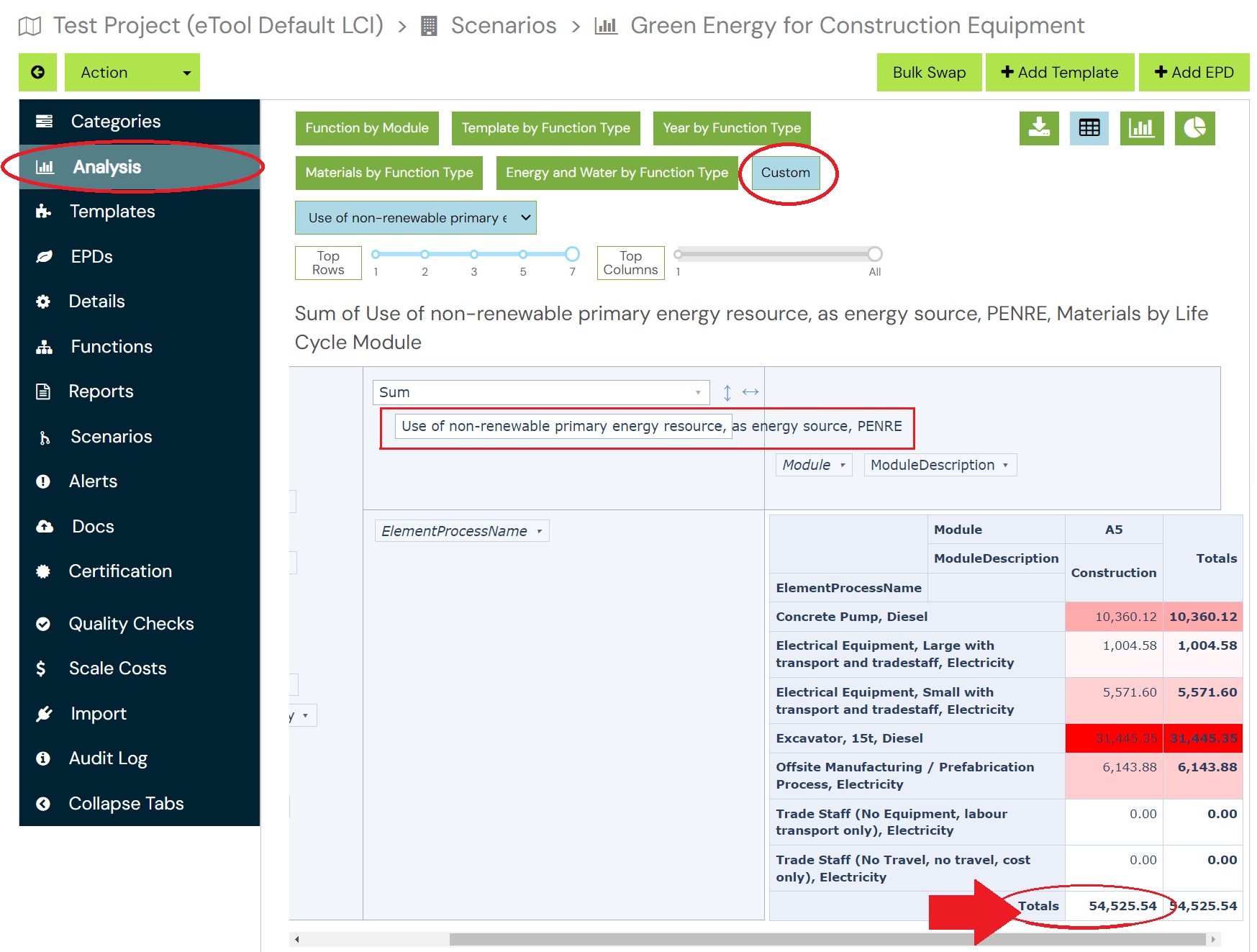
Total MJ for Construction Equipment Energy will be:
Total MJ =PERE(MJ) + PENRE (MJ) = 137.01 MJ + 54525.54 MJ = 54662.55 MJ
2. Add the Offset EPD into Your Design
Then, use this EPD: Construction Energy Impact Offset (A5) – Australasian v19 Dataset specially created to offset the GWP impact of Construction energy use (module A5).
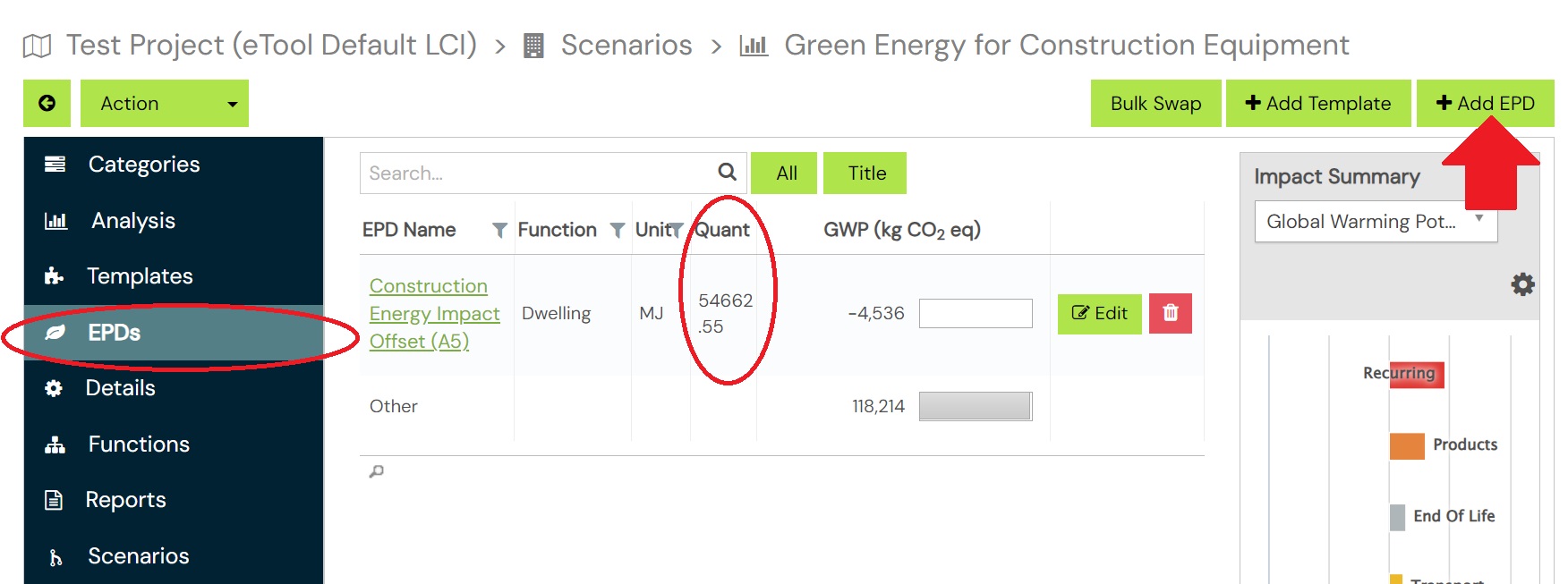
Please note that this EPD is based on Australasian v19 Dataset, If your project is different from the Australasian v19 dataset, you will need to calculate the correct GWP/MJ figure for your project to create a new EPD as this figure varies depending on dataset specified.
Calculating the GWP/MJ figure for alternative LCI Sources
As is mentioned above, a new correlation GWP/MJ will need to be calculated to create the EPD to offset the GWP impact of Construction energy use (module A5) when using LCI sources different from Australasian v19 dataset.
To do this, please use the Analysis tool once more to obtain the GWP for the entire construction equipment in your project.
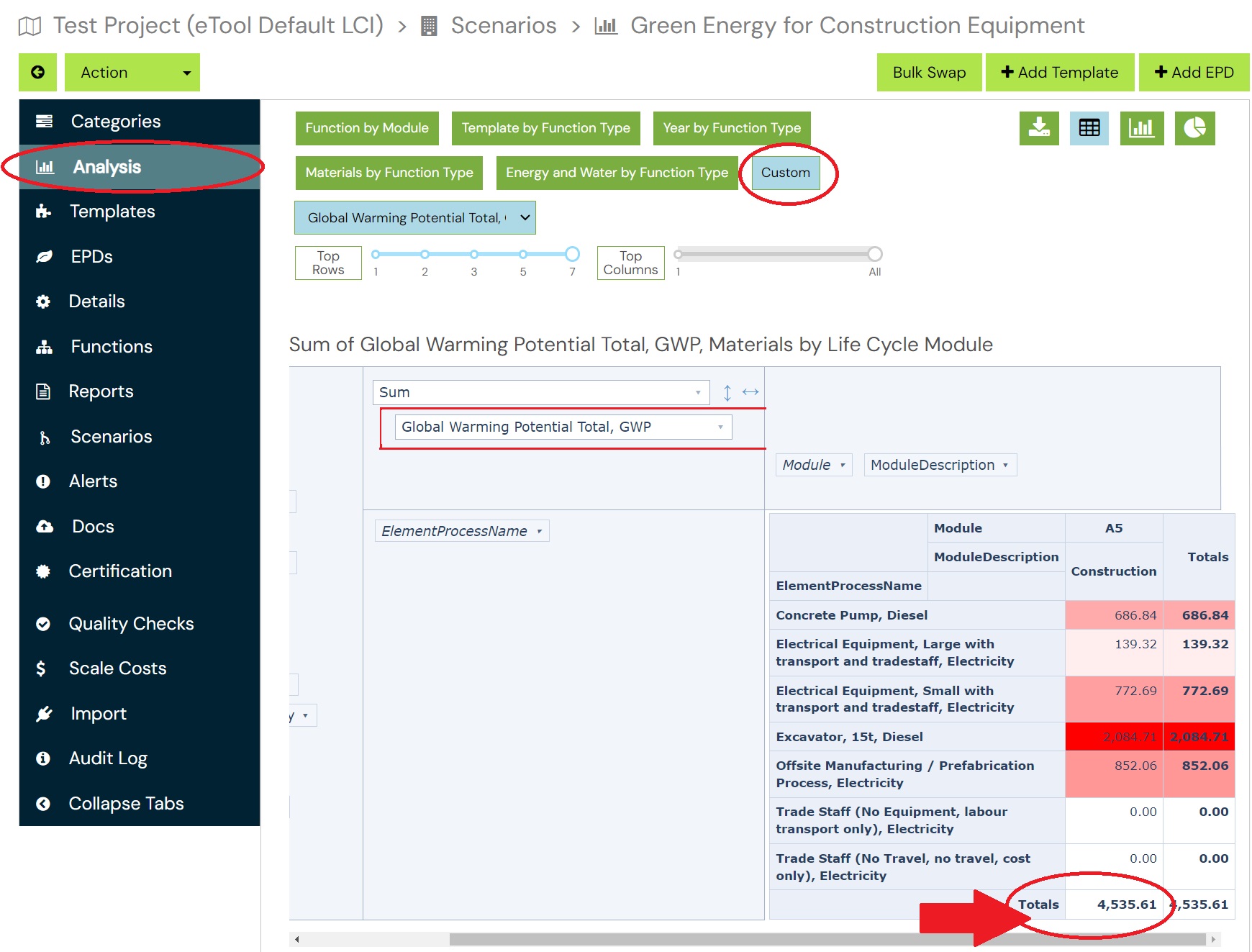
Since you’ve already calculated the total MJ to be offset, as explained above, you can now determine the GWP/MJ correlation.
E.g: according this example you will get the results as below
GWP/MJ = 4535.61 /54,662.55= 0.0829747240112289
Clone ‘Construction Energy Impact Offset (A5) – Australasian v19 Dataset’ EPD to incorporate the updated GWP/MJ figure. Ensure that the GWP/MJ figure added to the EPD is represented as a negative value to denote the offset. Additionally, make sure that the new EPD is appropriately named, indicating the specific LCI source used in the project.

Reporting
To generate the LCA report for carbon neutral/offset scenarios, please refer to the following post;
Reporting for Carbon Neutral Construction
Related Articles:
Modeling Carbon Neutral Construction in eTool
Modeling Carbon Neutral Products in eTool
GreenPower & Renewable Energy Purchase Agreements in LCA
Model Carbon Offsets for Remaining Impacts
