
We are excited to introduce eTool’s new Multi End-of-Life Disposal Methods feature.
Materials can now have multiple and varied disposal methods/End-of-Life options, allowing users the flexibility to model a wide variety of disposal/End-of-Life scenarios. Product disposals (open loop recycling, closed loop recycling, sent to landfill or no disposal) can be set in any combination by percentage and with multiple transport methods and distances for each method.
How to Edit Disposal Methods in Templates
To edit disposal methods in templates, you need to navigate to the “Edit Material” tab and follow the animation below.
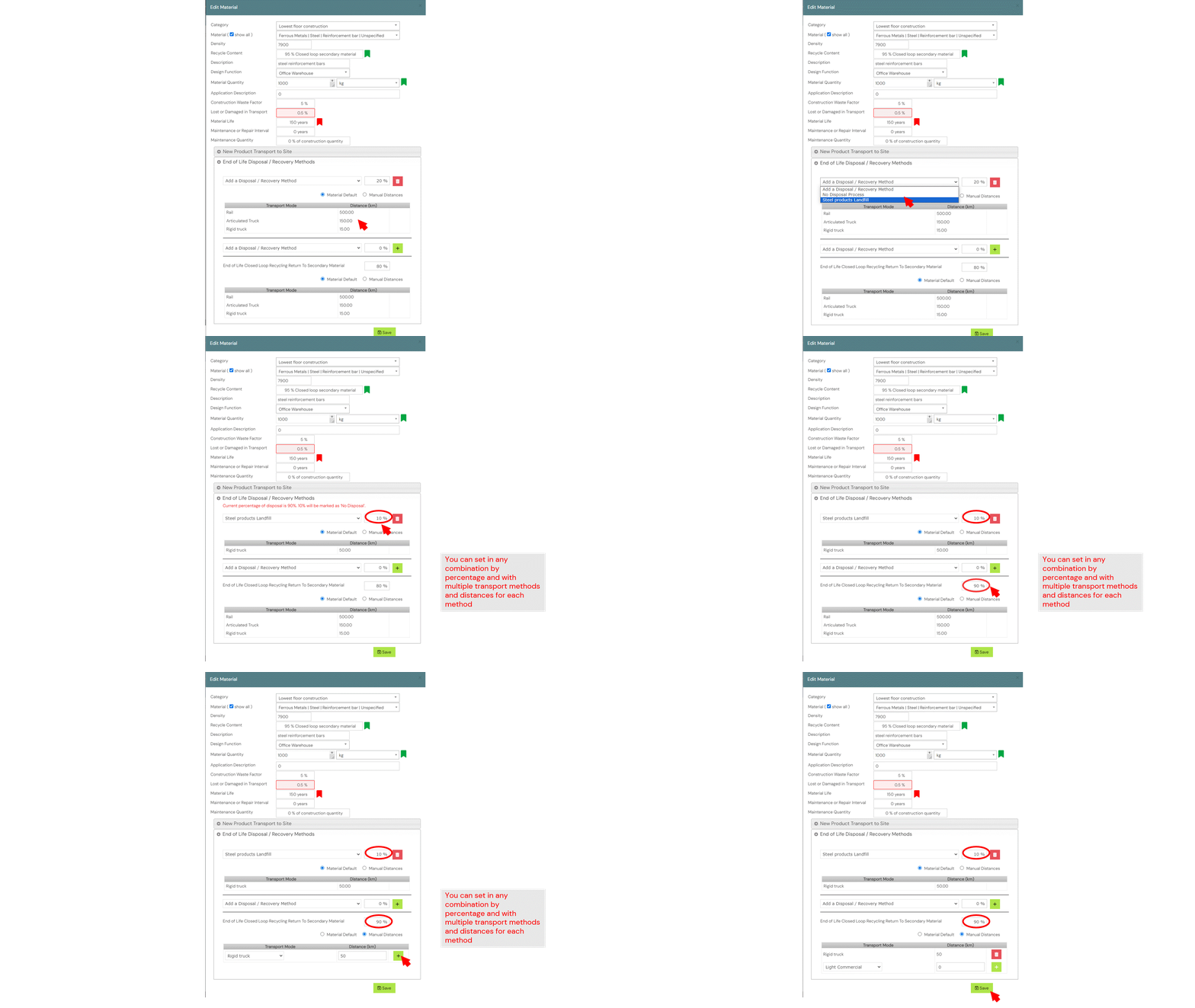
It is important to remember that while you can set as many methods as you like, the total percentage for EOL disposal must add up to 100%.

How to Edit Disposal Methods in Design
With the new multi-disposal methods, the bulk swap for material disposal methods at the design level is now available. If multiple materials have been selected, only disposal options that is applicable for all materials will be available for selection. It also includes warning to update EOL disposal when a new material is swapped. For more information on the bulk swap feature, refer to this support post.
Please note that bulk swapping of material disposal methods at the design level is now available for the new Multi End-of-Life Disposal Methods!
