
The new RICS WLCA 2nd Edition standard, published in September 2023 has come into effect as of 1 July 2024.
There are notable changes from EN 15978 and the previous RICS 2017 guidance in the following areas:
- Reporting modules
- Element categorisation for buildings and infrastructure
- Default parameters and emissions factors
- Transport impact calculations
- Biogenic carbon
- Uncertainty analysis
- Decarbonisation
Note:
At present, the BRE IMPACT dataset (used for BREEAM and other BRE-managed certifications) and the eTool Default dataset (aligned with EN15978) — along with their respective templates — are entirely separate and not interchangeable.
This guideline applies specifically to projects using the eTool Default dataset. Therefore, the Excel Report – RICS WLCA 2E Buildings v2.0 is not compatible with projects that use the BRE IMPACT dataset.
Jump to the following sections in this post:
- Project setup for RICS WLCA 2nd Edition
- RICS Reporting
- Related posts
Project setup for RICS WLCA 2nd Edition
Summary:
This is the summary of steps to that line up your project to the new RICS standard in eTool. Detailed instructions and information will follow after the break.
- In the Project level:
- For the LCI Source, select the regionalised LCI dataset, ‘United Kingdom RICS LCI‘ under the Project Details tab.
- Update the Calculation Standard to ‘RICS WLCA 2E (2023)’ under Project Details tab.
- Under the Indicator tab, turn on the three indicators – ‘Global Warming Potential Fossil, GWP F‘, ‘Global Warming Potential Biogenic, GWP B’ and ‘Global Warming Potential LULUC, GWP L‘.
- Under the Site Attributes tab, select the ‘RICS UK’ grids as applicable for electricity, water supply, water treatment or gas.
- Turn on the ‘Carbon Data’, ‘Quantities’ and/or ‘Design Phase’ (whichever is applicable) uncertainty factor checks under the Uncertainty tab.
- In the Structure level:
- Update the Categorisation Standard to ‘RICS WLCA 2E (2023)’ for buildings or ‘ICMS3’ for infrastructure assets under the Construction Scope tab.
- In the Design level:
- Toggle the ‘Return Journey’ check-box for both BAU & Proposed Designs to include return journey calculations under the Details tab .
- Review and update, if necessary, the end-of-life disposal methods of inputs in your study as per the new RICS recommendations.
- If there are any refrigerant gases in your project, you will need to manually update the material’s B1 profile to account for fugitive emissions (0%, 2%, 4% or 6%).
Please note that making these updates does NOT guarantee that your study will be compliant with the new RICS standard – it simply means that the module impact calculations are in accordance with the standard. Peer review is recommended to verify compliance, therefore we encourage eTool subscribers to take advantage of our Certification services.
For existing projects, following the steps above will adjust the element categorisation, and allocate the impacts to the respective modules for all templates/inputs in the Design as required by the updated standard.
If your project already includes certified designs, you won’t be able to make the updates above as the project will be locked. Should you need to line up your certified project with the new RICS standards, please submit a support request, and we will be able to help you.
1. Calculation Standard
In the Project level, you need to line up your LCA with the new RICS standard by selecting the ‘RICS WLCA 2E (2023)‘ calculation standard as per the animation below.
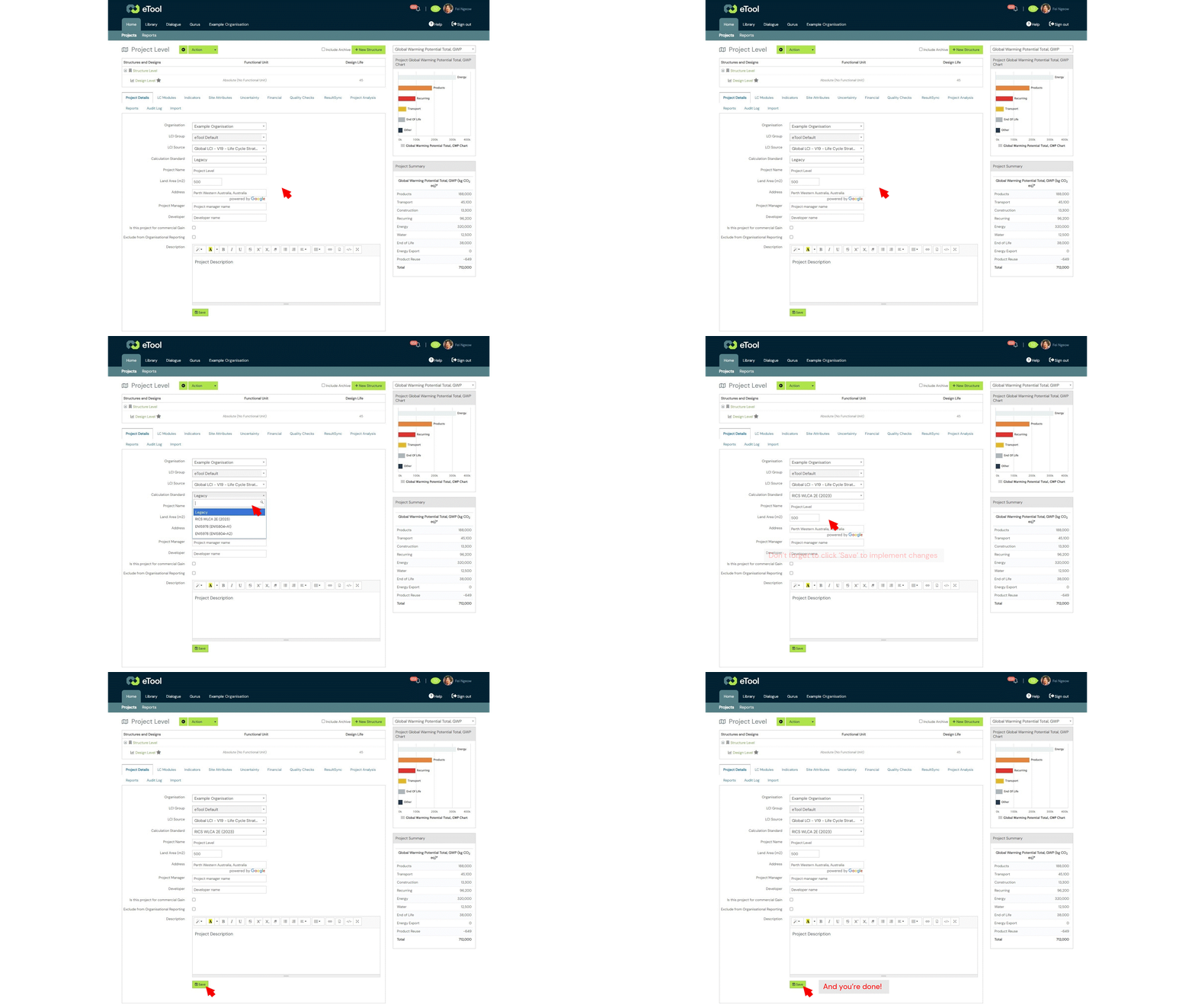
For more information on the other new calculation standards, please refer to this Calculation Standard support post.
Once the RICS calculation standard has been implemented, the following reporting modules are automatically lined up to RICS for your project in eTool:
Reporting Modules
The following tables list the new modules (optional) and sub-modules that will be available for reporting in eTool in the All Impacts Report.
Note: All templates in eTool will be automatically converted to whichever calculation method that is specified in your Project when you add it to your Design.
|
New Optional Modules |
Description |
|---|---|
| A0 | Non-physical pre-construction activities (e.g. surveys, design & consultation activities) |
| B8 | User activities not covered in B1-B7 |
|
New Sub-Modules |
Description |
|---|---|
| A5.1 | Pre-construction demolition (if applicable) |
| A5.2 | Construction activities |
| A5.3 | Waste and waste management |
| A5.4 | Worker transport (optional) |
| B1.1 | In-use material emissions and removals |
| B1.2 | In-use fugitive emissions (refrigerants) |
| B4.1 | Replacement of construction products, components, and systems |
| B4.2 | Replacement of industrial systems (e.g. accidental release of refrigerants) |
| B6.1 | Operational energy from regulated integrated systems |
| B6.2 | Operational energy from un-regulated integrated systems |
| B6.3 | Operational energy from un-regulated plug-loads |
| B7.1 | Water used by integrated systems |
| B7.2 | Water used by other integrated systems |
| B7.3 | Water used by non-integrated systems |
| B8.1 | Impacts associated with building user mobility/transport not covered in B6 |
| B8.2 | Impacts associated with user charging of electric vehicles on-site |
| B8.3 | Other impacts associated with user activities relating to the building’s intended use |
2. Element Categorisations
We’ve added two new element categorisation for buildings and infrastructure projects to line up with the new RICS standard. For Infrastructure projects, we have now incorporated infrastructure specific categorisations in eTool which is based on the ICMS 3rd edition categorisation groupings for civil engineering works.
Below is the list of categorisations available in eTool:
- RICS NRM (2012) for Buildings (original categorisation)
- RICS WLCA 2E (2023) for Buildings (NEW!)
- ICMS3 for Infrastructure (NEW!)
Note: you can use either RICS WLCA 2E (2023) for buildings or ICMS3 for infrastructure categorisations for LCAs suited to RICS WLCA 2nd Edition.
For instructions on how to update your categorisations to either the RICS WLCA 2E (2023) (buildings) or ICMS3 (infrastructure), please refer to the following support post:
3. Default Emissions Factors
The new RICS standards recommends that the latest version of the Government conversion factors (UK), or the equivalent for other countries be used when no better information (such as from an EPD or from direct measurement) is available to provide emissions factors for the following:
- Transport & End of life emissions
- Refrigerant emissions
- Electricity grid & Water use emissions
a. Transport & End of Life Emissions
We’ve created a new dataset based on the 2023 UK government conversion factors to make modelling with these emissions factors easier. The ‘United Kingdom RICS LCI‘ dataset will have the RICS recommended emissions factors for transport and end-of-life impacts as well as energy sources such as petrol and diesel.
To select the RICS dataset, navigate to the Project Level under the Project Details tab. Under LCI Source, select the ‘United Kingdom LCI – V20 RICS Life Cycle Strategies‘ dataset from the drop-down list.

b. Refrigerant Emissions
If applicable, fugitive emissions from refrigerant gas loss needs to be reported under module B1.2 for RICS WLCA 2E. In the past, fugitive emissions have been reported under module B4 in eTool.
To line up your study with the new RICS standard, please follow the steps below for refrigerant gas inputs:

c. Electricity Grid & Water Use Emissions
For electricity and water use grids, please select the new ‘RICS UK 2023’ grids under Site Attributes tab in the Project level with the only exception being the gas grid which needs to be ‘General Distributed Gas’ instead. The emissions factor for the General Distributed Gas grid matches the 2023 UK government conversion factors.

4. Default Parameters
The new WLCA PS states that these prescribed parameter inputs should be used when product specific details are not available.
The prescribed parameter inputs are:
- Transport Distances & Return Journeys
- End of life treatments
- Product lifespans
Due to the global nature of our public templates, it is still the Study Author’s responsibility to ensure that the templates used in their study are consistent with the RICS prescribed parameters where product specific details are unavailable. Should they need to be amended, Study Author’s may update these parameters themselves.
a. Transport Distances & Return Journeys
As per the new RICS guidance, the default transport distances for UK-based projects are listed below:
| Transport scenario (both road and sea to be used) | km by road | km by sea |
|---|---|---|
| Locally manufactured (ready-mixed concrete) | 20 | – |
| Locally manufactured (general), e.g. aggregate, earth, asphalt | 50 | – |
| Regionally manufactured, e.g. plasterboard, blockwork, insulation, carpet, glass | 80 | – |
| Nationally manufactured, e.g. structural timber, structural steelwork, reinforcement, precast concrete | 120 | – |
| European manufactured, e.g. cross-laminated timber (CLT), facade modules | 1,500 | 100 |
| Globally manufactured, e.g. specialist stone cladding | 500 | 10,000 |
Select the regionalised LCI dataset, United Kingdom RICS LCI, and eTool will automatically update the transport distances for all materials in your Design.

Return Journeys
Despite likely deviating from EN 15978, the WLCA PS specifies that delivery vehicle return journeys are to be included in the impact calculation for module A4. Return road journeys are to be accounted for using an ‘empty running factor’ and 0% laden vehicle emission factor. Return journeys are not applicable for sea and rail as these are assumed to be always laden with new products.
Note that transport of construction workers is not to be counted under A4, but (optionally) under A5.4.
Please note that the BAU version should include return journeys wherever the proposed design model includes return journeys. If external parties are providing baseline data and also require RICS compliance, then they should ensure that the baselines are also compliant i.e. include return journeys. This can be added manually by including the ‘Include Return For Material Transport’ option in the Details tab at the design level.
To set up your study to include return journeys, navigate to Design > Details Tab > ‘Include Return For Material Transport’ checkbox.

b. End Of Life Treatments
The new RICS standard recommends that the following parameters in the table below be used when no better information (such as from an EPD or from direct measurement) is available. Generally speaking, we believe that the current end-of-life treatments specified for our templates are based on reasonable assumptions and should suffice. However users also have the option to modify these inputs themselves manually.
To update your design, follow the guidance from the support post below: New Multi End-of-Life Disposal Methods
| Material | Details | Reuse | Recycling | Incineration with/without energy from waste |
Disposal (landfill & losses) |
|---|---|---|---|---|---|
|
Concrete
|
Cast in situ | 0% | 97.50% | 0% | 2.50% |
| Precast | <1% | 96.50% | 0% | 2.50% | |
|
Steel
|
Hot-rolled structural sections, including plate & tubes | 7% | 93% | 0% | 0% |
| Light gauge galvanised steelwork, e.g. studwork, cladding framing | 5% | 93% | 0% | 2% | |
| Piles (sheet or bearing) | 15% | 71% | 0% | 14% | |
| Rebar | 0% | 98% | 0% | 2% | |
|
Masonry
|
Blockwork | 0% | 97.50% | 0% | 2.50% |
| Brickwork | <1% | 97.50% | 0% | 2.50% | |
|
Timber
|
Solid timber (untreated, uncoated) | <1% | 78% | 20% | 1% |
| Treated, coated timber (non-hazardous) | 0% | 30% | 69% | 1% | |
| Engineered timber (CLT, glulam, etc.) | 5% | 35% | 59% | 1% | |
| Wood-panel products | 0% | 0% | 99% | 1% | |
|
Aluminium
|
Sheet | 0% | 96% | 0% | 4% |
| Profile | <1% | 96% | 0% | 4% | |
| Plasterboard | General | <1% | 17% | 0% | 83% |
| Glass | All types | 0% | 61% | 0% | 39% |
| Plastics | All types | 0% | 0% | 100% | 0% |
| Coatings | Paints, intumescent coatings, cementitious sprays | 0% | 0% | 0% | 100% |
|
Insulation
|
Mineral-based | <1% | 99% | ||
| Hydrocarbon-based | 95% | 5% | |||
| Biobased | 95% | 5% | |||
| Asphalt | All types | 0% | 97.50% | 0% | 2.50% |
| Unbound aggregate | All types | 0% | 97.50% | 0% | 2.50% |
| Soils | Includes topsoil & inert non-hazardous earth | 0% | 97.50% | 0% | 2.50% |
|
MEP equipment
|
Heat-generation equipment | 0% | 70% | 0% | 30% |
| Pipes | 0% | 90% | 0% | 10% | |
| Lights | 0% | 45% | 0% | 55% | |
| Ventilation system | 0% | 40% | 0% | 60% | |
| Radiators | 0% | 80% | 0% | 20% | |
| Wire cables | 0% | 50% | 0% | 50% |
c. Product Lifespans
As per the new RICS guidance, the recommended product lifespans in lieu of product specific (EPD or direct measurement) are listed in the table below. We generally believe that the current product life spans specified for our public templates are based on reasonable assumptions and should suffice. However users also have the option to modify these inputs themselves manually.
To update your design, you can follow the guidance for using the the Bulk Swap Tool in the support post below to update the product service life in your study: Bulk Swap
| Building part | Building elements/components | Expected lifespan |
|---|---|---|
| Substructure | Piling and foundations Lowest ground floor |
60 years (or building lifespan) |
| Superstructure: frame, upper floor and roof structure | Structural elements, e.g. columns, walls, beams, upper floor and roof structure | 60 years (or building lifespan) |
|
Facade
|
Opaque modular cladding: Rain screens, timber panels Brick, stone, block and precast concrete panels |
30 years 60 years |
| Glazed cladded/curtain walling | 35 years | |
| Windows and external doors: Hardwood/steel/aluminium windows Doors |
30 years 20 years |
|
| Roof | Roof covering: Single-ply membrane Standing seam metal Tiles, clay and concrete |
30 years 30 years 60 years |
| Superstructure | Internal partitioning and dry lining: Studwork Blockwork |
30 years 60 years |
|
Finishes
|
Wall finishes: Render/paint | 30/5 years respectively |
| Floor finishes: Carpet/vinyl Stone tiles Raised access floor (RAF) pedestal/tile |
7 years 25 years 50/30 years respectively |
|
| Ceiling finishes: Substrate/paint Suspended grid (ceiling system) |
10 years 25 years |
|
| FF&E | Loose furniture and fittings | 10 years |
|
Services/MEP
|
Heat source, e.g. boilers, calorifiers | 20 years |
| Heat source, e.g. heat pumps (except ground source) | 15 years (20 years) | |
| Space heating and air treatment | 20 years | |
| Central cooling systems (cooling only), e.g. fan coil systems, variable air volume, variable refrigerant volume | 15 years | |
| Ductwork: Galvanised Plastic or flexible |
40 years 15 years |
|
| Electrical installations | 30 years | |
| Lighting fittings | 15 years | |
| Communications installations and controls | 15 years | |
| Water and disposal installations | 25 years | |
| Rainwater harvesting and grey water collection | 30 years | |
| Sanitaryware | 20 years | |
| Lift and conveyor installations | 20 years | |
| Hard landscaping | Asphalt Concrete and stone paving Timber decking |
35 years 60 years 15 years |
5. Biogenic Carbon
Under the WLCA PS, biogenic carbon is to be treated in accordance with EN15804+A2 (2019). This means that biogenic carbon from sustainably sourced materials must be treated as 100% released/transferred to nature at end of life, and biogenic carbon from non-sustainably sourced materials is treated as LULUC carbon (no sequestration, emissions only).
This update has been incorporated into the eTool algorithms so that all you need to do to is to turn on the three indicators below in the Project Level > Indicators tab:
- Global Warming Potential Fossil, GWP F
- Global Warming Potential Biogenic, GWP B
- Global Warming Potential LULUC, GWP L

For more information on how to pull the biogenic data out of eTool, please refer to the support post below: Separate Reporting for Biogenic Carbon
6. Uncertainty Analysis
The WLCA uncertainty factor is the sum of the contingency factor, the carbon data uncertainty factor, and the quantities uncertainty factor. The carbon figures in the WLCA are increased by the WLCA uncertainty factor for reporting.
The three factors are accounted for in the following areas which are also linked to further information on how these are calculated:
For more information on how to set up the uncertainty factors in eTool, please click on the following link: Uncertainty Analysis.
Note: The contingency factor, carbon data uncertainty factor and quantities uncertainty factor are reported in the All Impacts Report. The WLCA uncertainty factor can be calculated from these as per the WLCA PS.
7. Decarbonisation
Under the new RICS, LCA results must be reported both with and without decarbonisation of the electricity grid (affecting modules B6, B7, B8 & D2), and of materials.
For the UK, the most recent Future Energy Scenario (FES) falling short scenario should be used. Decarbonisation of the electricity grid also needs to be applied to water use and water treatment reported in module B7.
Material decarbonisation is estimated using a matrix that sets out various decarbonisation factors for the life cycle modules based on the reference study period year. The material decarbonisation scenarios outlined in Table 15 of the RICS guidelines have been used to adjust the embodied impacts for all products.

When modelling the decarbonised grid version of your project, we recommend the following steps:
- Get the non-decarbonised grid version of the Design certified.
- Clone the Design into a new Project for the decarbonised version.
- Navigate to the Site Attributes tab in the Project Level of the new cloned project & update the grids to the ‘RICS decarbonised’ grids (including the gas grid).
- Click save and in the following pop-up notification, select ‘All Entries’ to ensure that all operational inputs in your project are updated to the new grids.

- Your design should now automatically update all grid inputs to the new grids.
For the decarbonisation of Materials, our eTool automated RICS reports will produce the results with and without material decarbonisation.
RICS Reporting
For RICS reporting, eTool users can populate the RICS reporting templates outside of eTool with data from the All Impacts Report generated from both the standard & decarbonised grid Designs. We are working on an automated RICS report that will become available soon.
According to the new RICS standard, the Study Author must explicitly disclose the data source, the generic data, territorial scope and basis (consumption- or production-based) for the various types of carbon data used in the WLCA. We recommend that eTool users add these details in the Structure Level > Structure Info > Description tab to ensure that this information is pulled into the automated LCA Report.

Operational Energy
We’ve added 6 new operational categorisations as below to our existing list to allow users to report operational energy with the required level of granularity.
| Operational inputs |
|---|
| Operational Energy |
| Appliances | Dishwashers |
| Appliances | Entertainment |
| Appliances | Laundry |
| Appliances | Office Workstations |
| Communications |
| Cooking & Food Preparation |
| Domestic Water Heating |
| Electrical Parasitic Loads |
| Emergency Generator Use & Maintenance Hours NEW! |
| Fire Protection |
| HVAC | Cooling NEW! |
| HVAC | Heating NEW! |
| HVAC | Humidification NEW! |
| HVAC | Mechanical Ventilation NEW! |
| HVAC | Pumping NEW! |
| Industrial, Manufacturing Equipment |
| Lifts, Elevators & Conveying |
| Lighting |
| Miscellaneous |
| Monitoring, Control & Automation |
| Power Generation & Storage |
| Refrigeration |
| Safety & Security |
| Swimming Pools |
| Water Pumping |
| Workshops, Garage & Misc. |
| Operational Water |
| Water Supply |
| Water Removal & Treatment |
Please ensure that your operational inputs have been assigned to the correct categories. You may use the ‘Energy’ tab in the Bulk Swap tool to update the reporting categories for your operational inputs: Bulk Swap.

Related Posts
- eTool conformance to RICS WLCA 2nd edition
- New London Plan – Whole Life Carbon Guidance
- Calculation Standard
- Element Categorisation
- Updated EN15804+A2
- References for Transport
- Multi End-of-Life Disposal Methods
- Biogenic Carbon
- Modelling Operational Energy (renewable energy generation) – EN15978
