What's The Difference Between The Different Subscription Plans?+-
Please refer to this link for details about our different subscription plans: eTool Subscription Pricing

Please refer to this link for details about our different subscription plans: eTool Subscription Pricing
Embedding LCA at an organisation level has become easier and will provide added value with centralised ownership of LCA models, floating seats, inter-company collaboration for integrated design and unrestricted number of read-only users.
The subscriptions such as the Specialist & Hotseat, come with the enterprise functionality which is best for organisations that have developed LCA capacity working on a variable number of projects who prefer some per-project costs to help manage fluctuations in the work.
Enterprise functionality benefits and features:
Check out how it works in this quick demonstration:
See additional info on How to set your organisation up in eTool – Enterprise Functionality.
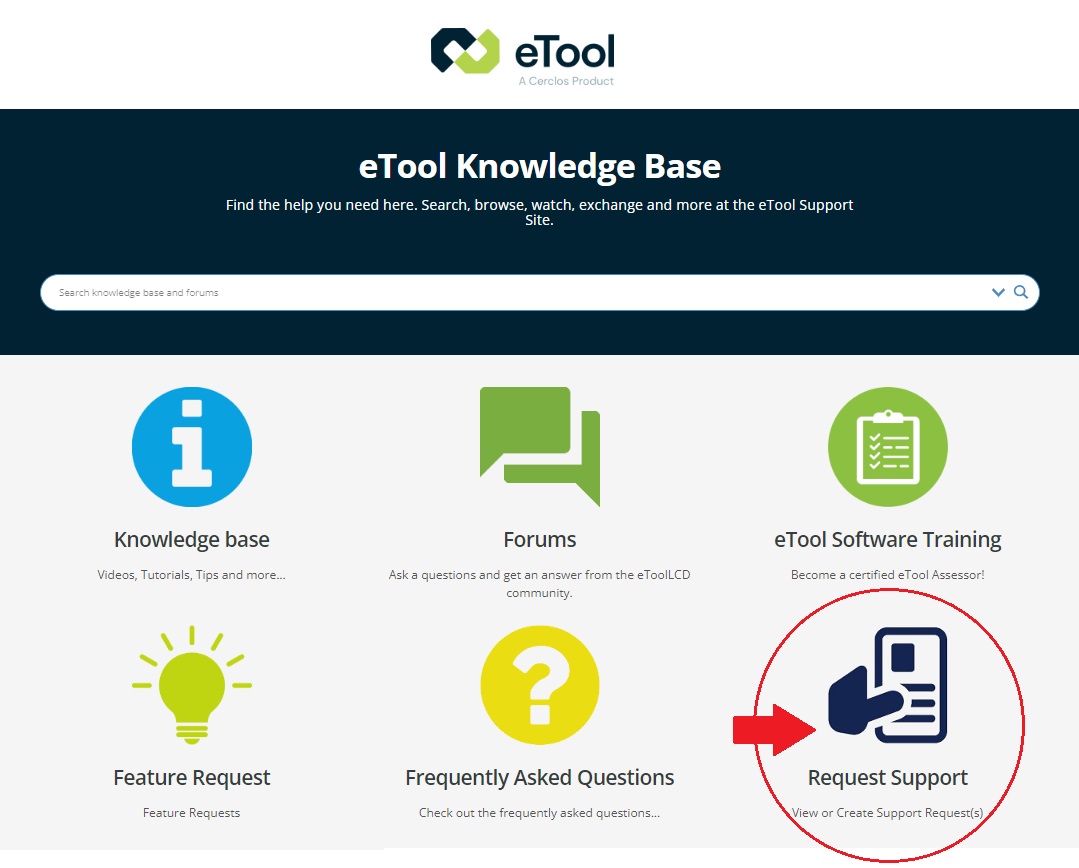
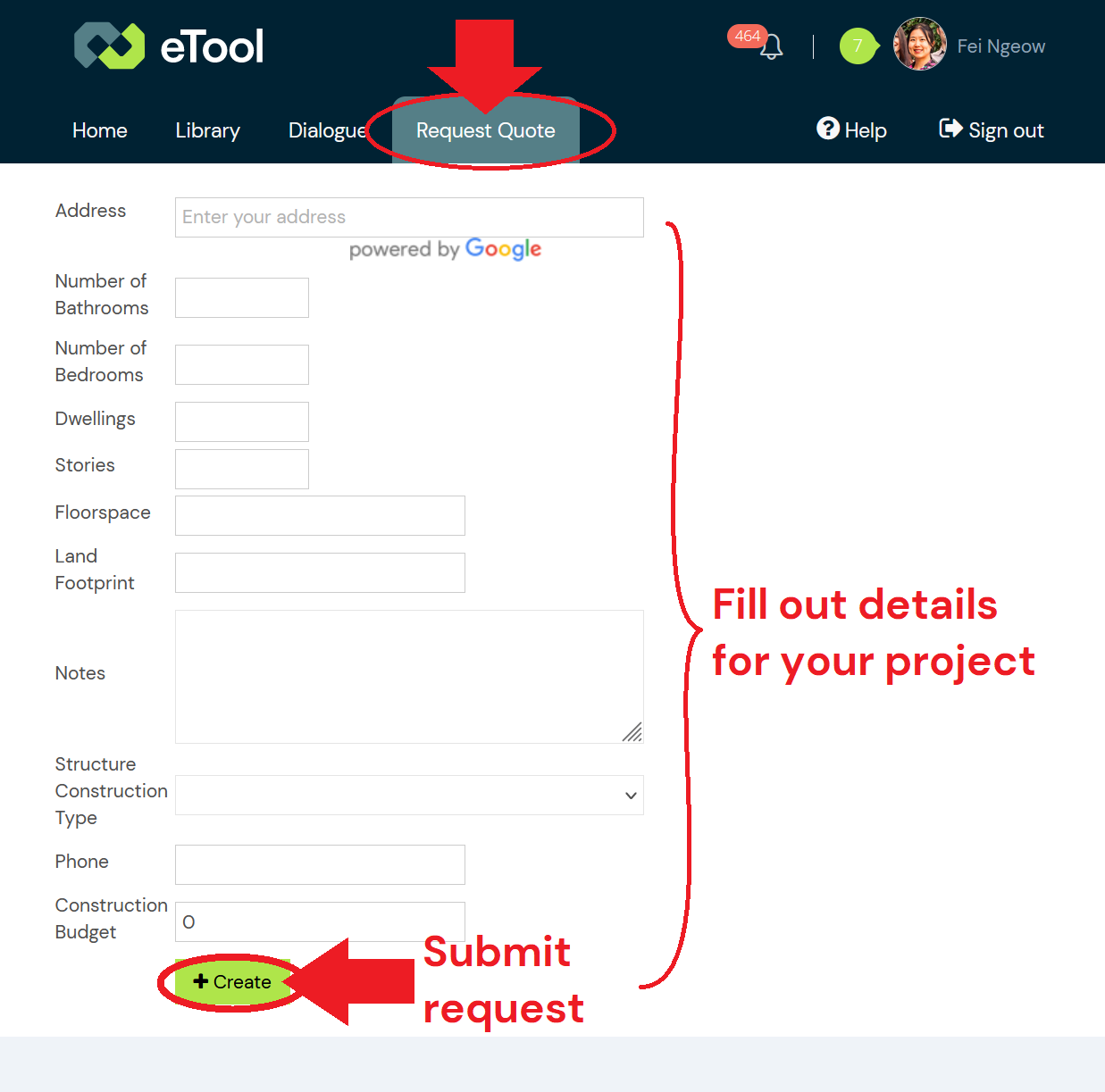
If you’re on a Starter or Standard subscription, or one of the discontinued Consultant or Enterprise plans, you will need to pay an Project fee prior to using eTool to start your project. To raise an invoice for this, you can do so via your eTool dashboard under the ‘Request Quote’ menu.
Even if you do not currently hold an active subscription, you may start the process of finding out which subscription most suits you by requesting a quote anyway.
Alternatively, you can contact us via the link below:
In light of our recent updates to our eTool Plans, we also want to inform you about a change in our fee structure. The Access Fee will now be referred to as the Project Fee.
Attention Starter and Standard Subscribers: You may be subject to Project Fees. Please see the details below. Only Specialist/Specialist Hotseat subscribers are exempt from this fee.
Note: If you’re on a discontinued Consultant or Enterprise subscription, you will need to pay a Project fee prior to using eTool to start your project.
Why does eTool charge a Project fee?
Purchase of additional Projects: The fees are for the complete use of eTool software, including all LCA/LCC features associated with your subscription level, development of new features, software maintenance & life cycle inventory data.
Project fee is paid before you start a new project for commercial gain.
Third-party Design Certification: Get your project verified according to EN 15978, ISO 14040 and ISO 14044 standards. For Starter Plan subscribers, an additional project fee applies for third-party design certification, as this service is not included in your subscription package.
Do I need Certification?
If you intend to publish your results for commercial purpose, our Terms of Service stipulate that you must get your work certified before doing so. eTool recognised the importance of comparable and accurate results flowing from our software. ISO 14040 and ISO 14044 standards for LCA call for all studies to be verified by a third party. Going through the process will give you confidence that you have used the software correctly and that your study is of a high quality.
The certification process involves support for the users conducting the LCA by way of coaching them on the use of the software to report and build an audit trail of changes in the model. It is an interactive process to ensure that the work not only meets required standards but also gains the most value out of engaging with Life Cycle Design. If you require more in depth coaching or mentoring for your project prior to submitting your work for certification review, you should consider our Advanced Support package.
How I request a quote?: Please get in contact to request a quote.
More information on the different subscriptions can be found here.
Additional information can be found at the eTool Services Specification, Project Licenses and Project Certification sections of eTool Software Use Terms and Conditions.
In response to user feedback and demand, eTool now offers subscription with dynamic seat sharing functionality to help improve the seat sharing experience.
Our recently released ‘Hotseat’ is built on user demand for more flexibility and freedom to share their seats in eTool. With this new hotseat feature, users now have an upgrade option to let the software automate the seat sharing functionality in real-time. This functionality makes seat allocation seamless and enhances the user experience. It also makes the use of purchased seats a lot more efficiently when simultaneous use of the software is not at its limit which is beneficial for multi-discipline design teams. When an organisation has purchased Hotseats, the org Admin is able to allocate these seats to their users in the ‘Manage Users’ tab. There is no limit to the number of users they could allocate these seats to as the Organisation Admin.
The ‘Hotseat’ is an upgraded version of the standard Specialist seat. The upgraded seat means that the software automatically manages the seat sharing function among multiple users that have been assigned the hotseat within the same organisation.
Set your organisation up in eTool – Enterprise Functionality
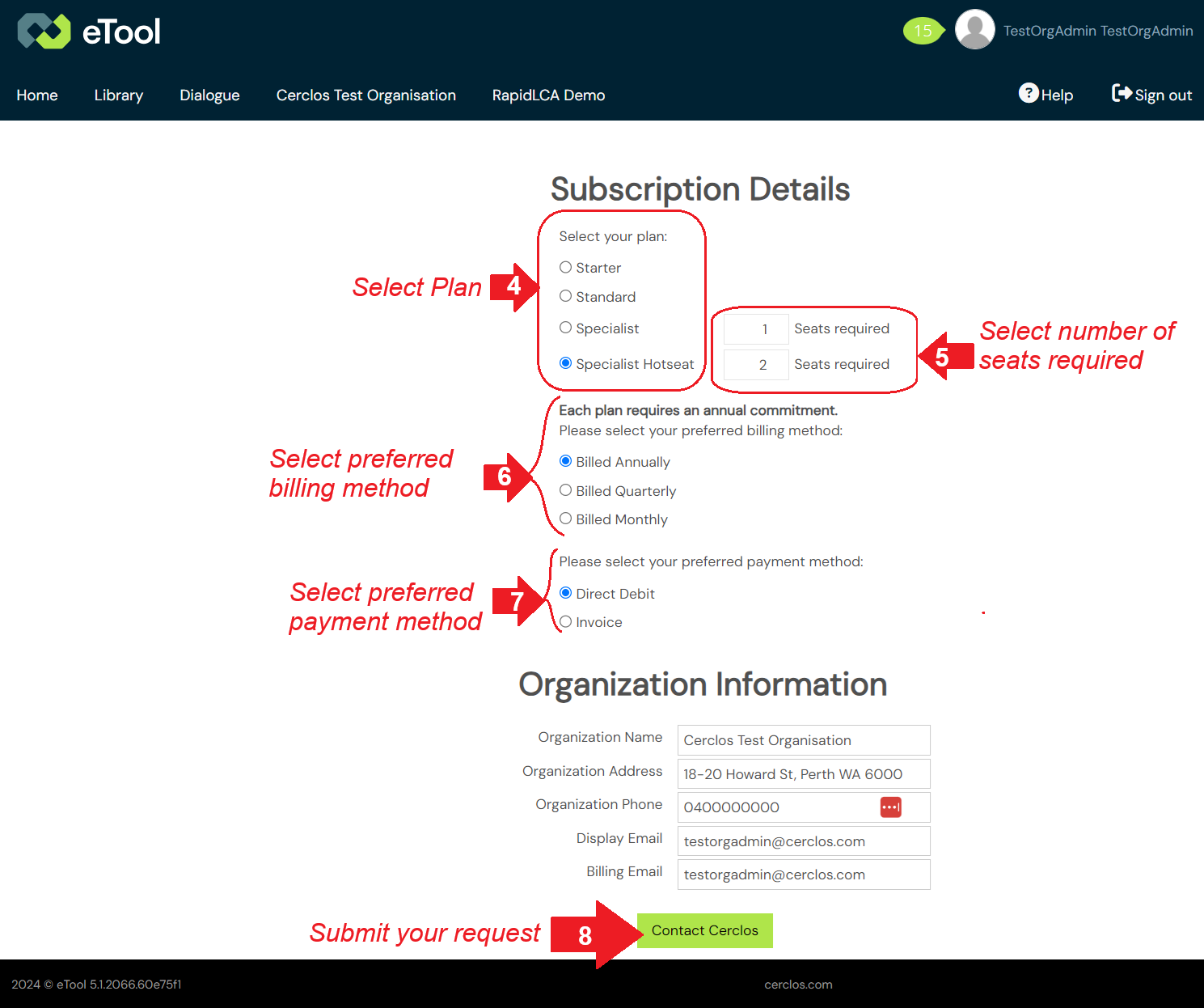
Note: If you are updating the details of an Organisation / Enterprise Plan containing seats, please see: How to Update My Organisation’s Subscription / Payment Details?If you are in a Open Use plan. As communicated in an official email, this plan has been discontinued. However, we are pleased to offer you a complimentary 14-day Trial plan, granting you unrestricted access to eTool.To continue beyod the trial, upgrade to one of our paid subscription for uninterrupted access, exclusive features, and support. Click here to upgrade.
Important update: we are in the process of phasing out the Consultant and Enterprise plans. As part of this transition, the personal (Consultant) plan is no longer available for new users.
What happens to existing users?
Existing users will continue to have access to their current plans and services. However, with the latest software update, these plans will not be able to renew their payment methods and will be automatically redirected to the current pricing and plan options.
What should I do if I encounter any issues?
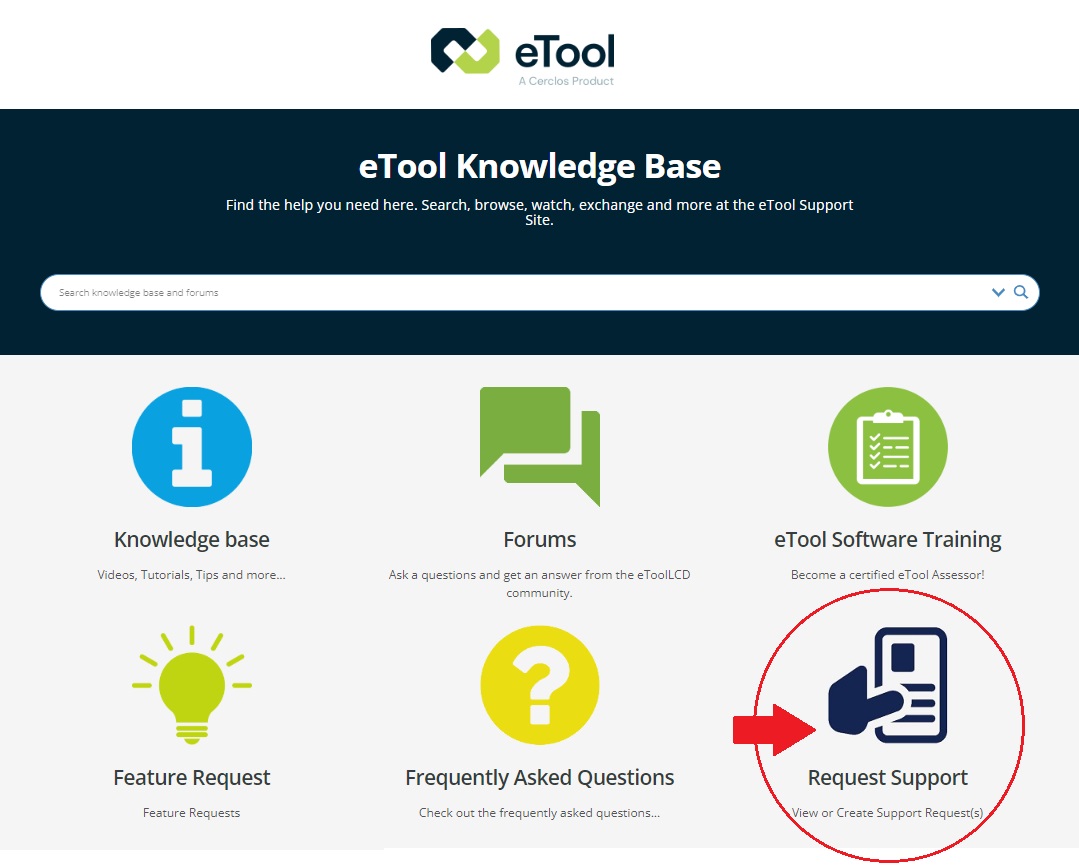
If you experience any difficulties due to this update, please reach out to us through our support platform and submit your support request for assistance.


More information on the different subscriptions can be found here.

Note: If you are updating the details of an Personal Plan, please see: How to Update My Personal Subscription / Payment Details?When you create an organisation, your Personal Plan stay as Trial user to avoid double-billing.

Please make sure to provide at least 30 days’ written notice of your intention to cancel, as required by our terms of service.
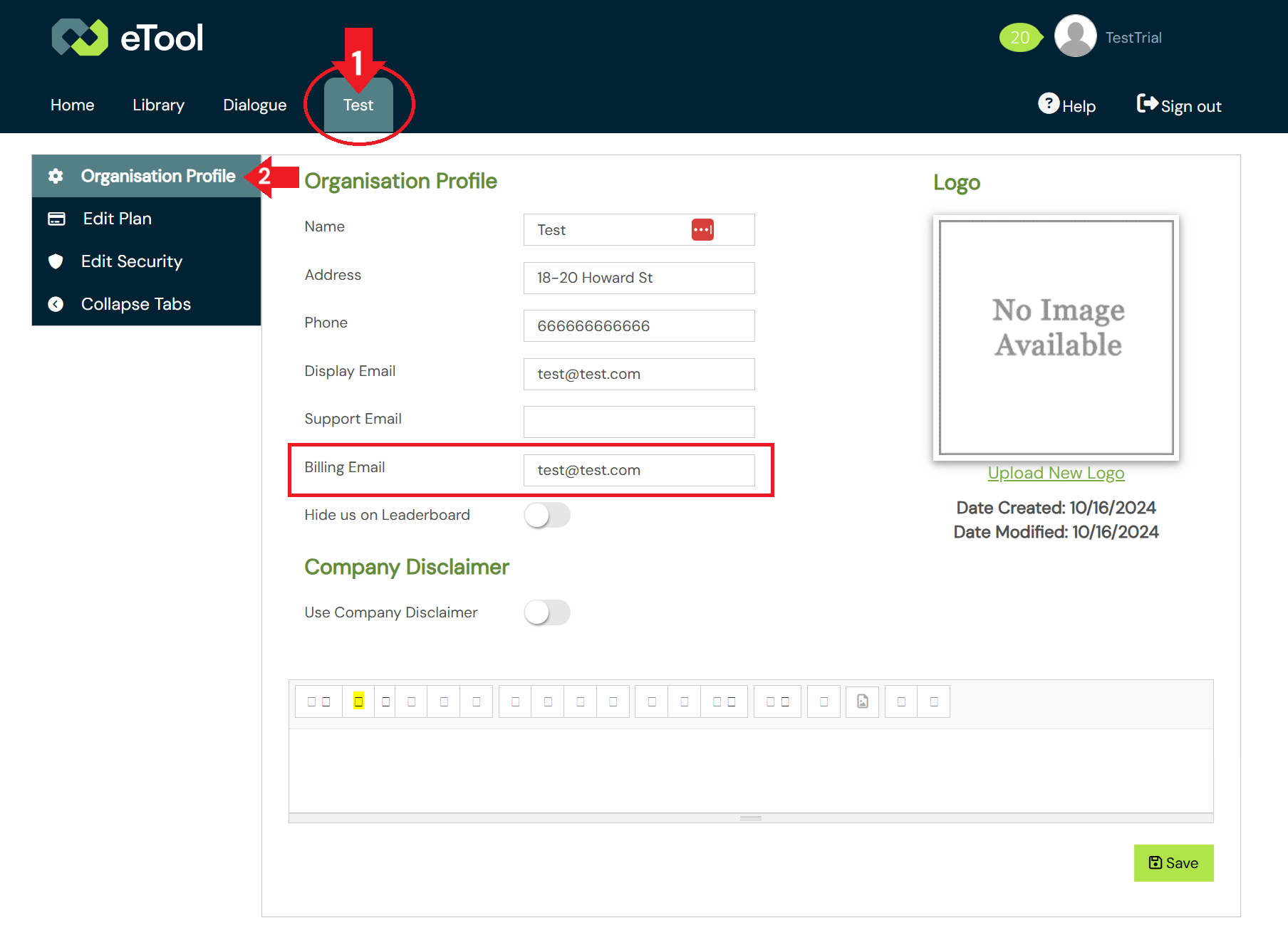
Yes. Under your organisation profile, you can enter a “Billing Email” where eTool will send all payment reminders, receipts and subscription notifications. This is done through the “Organisation Profile” tab in the organisation portal.
When you cancel any paid subscription, please be warned that all your projects will no longer be available to you once you’ve cancelled your subscription.
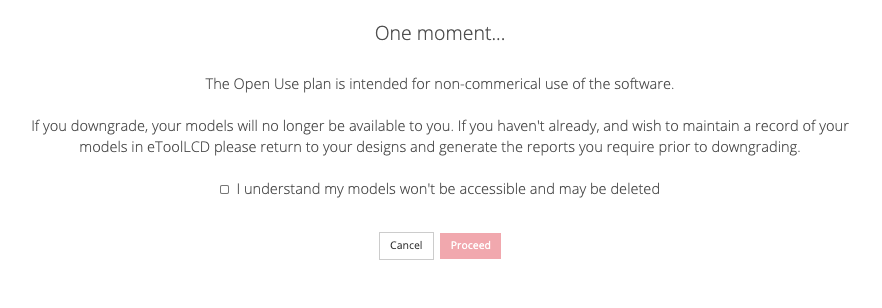 This just means that your Projects will no longer be maintained within eTool in that online format. However, you may retain all the data of your projects offline by downloading all the necessary reports from your designs. These reports will contain all the information you have entered into your designs and it is even possible to rebuild your LCA based on the info in those reports should you wish to do so in the future.
If you only wish to have have an offline copy of your work, we recommend downloading the following reports:

Once you’ve downloaded all your reports, you can proceed with cancelling your subscription as per the instructions in this support post:
Related Posts:
How to Update My Personal Subscription/Payment Details?
How Do I Make A Support Request
What Benefit Does My Organisation get with the Enterprise subscription?
Can you transfer a users data to my account?
PLEASE NOTE: eTool.app IS NOT ETOOL.AI
We’ve recently been made aware of an AI image editing app operating out of Hong Kong called ETOOL.AI who’s subscription model charges users automatically at the end of their software trial. We are not the same company and do not operate under the same subscription model.
If you’re seeking a refund from ETOOL.AI for a payment via GCash/PayPal, please contact ETOOL.AI directly as soon as possible.
You can reach their support team via the following contact information:
Email: support@etool.ai
Web: http://www.etool.ai/unsubscribe
Address:
Hong Kong Vision World AI Limited
UNIT 26 of FACTORY A ON STH FL
UNION HING YIP FACTORY BLDG.
20 HING YIP STREET KWUN TONG KL, HK
As we are unable to intervene in this process, please direct all further inquiries to them and we wish you all the best and hope you are able to reach a favourable resolution.
IF YOU CANNOT REACH ETOOL.AI We suggest the following as alternatives to seek a refund:
Contact your Credit Card provider: If you cannot reach them or the charge was unauthorized, contact your bank to dispute the transaction.
MAHALAGANG PAUNAWA: Ang eTool.app ay HINDI ang ETOOL.AI
Napag-alaman namin kamakailan na may isang AI image editing app na nagmumula sa Hong Kong na tinatawag na ETOOL.AI, kung saan awtomatikong sinisingil ang mga users pagkatapos ng kanilang software trial. Kami ay magkaibang kumpanya at hindi kami gumagamit ng parehong patakaran sa subscription.
Kung kayo ay humihingi ng refund mula sa ETOOL.AI para sa inyong ibinayad gamit ang GCash/PayPal, mangyaring makipag-ugnayan nang direkta sa ETOOL.AI sa lalong madaling panahon.
Maaari ninyong ma-contact ang kanilang support team gamit ang sumusunod na impormasyon:
Email: support@etool.ai
Web: http://www.etool.ai/unsubscribe
Address:
Hong Kong Vision World AI Limited
UNIT 26 of FACTORY A ON STH FL
UNION HING YIP FACTORY BLDG.
20 HING YIP STREET KWUN TONG KL, HK
Dahil wala kaming kakayahang makialam sa prosesong ito, mangyaring idirekta ang lahat ng inyong katanungan sa kanila. Hangad namin ang inyong kapakanan at umaasa kaming magkaroon kayo ng maayos na resolusyon.
KUNG HINDI NINYO MA-CONTACT ANG ETOOL.AI iminumungkahi namin ang mga sumusunod na alternatibo upang makakuha ng refund:
Makipag-ugnayan sa inyong Credit Card provider: Kung hindi ninyo sila ma-contact o kung ang singil ay hindi awtorisado (unauthorized), kontakin ang inyong bangko upang i-dispute ang transaksyon.